Measure the laptop as you carry it
Close the laptop and set it on a flat table. Put the ruler alongside the long edge and measure from the leftmost to the rightmost point. Move the ruler to the short edge and measure from the front lip to the farthest point at the hinge. Stand the ruler beside the thickest part, including any feet that stick out.
Repeat with the protective shell or padded case you use on the commute. Include raised corners, a zipper pull that stays outside the case body and any handle that cannot fold flat. For a soft case, leave it relaxed while you measure. It needs space to slide past the sleeve lining without being compressed.
Measure the mouth before the inside
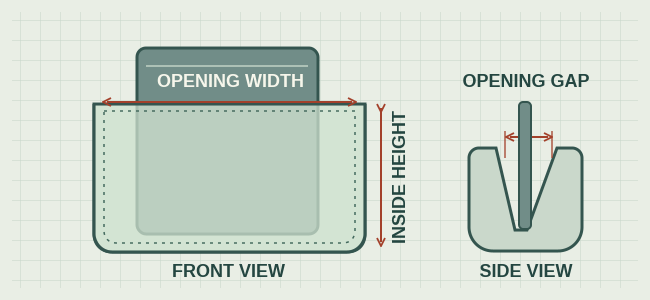
Open the backpack all the way and move straps aside. Place the ruler across the sleeve mouth, between the inner edges of the binding or zipper stops. Look for a taper, raised stitching or a strap anchor that narrows the path. Check the gap from front lip to back lip at the middle and near each end. Record the tightest gap the laptop has to pass through.
Slide the ruler down to the base and read the clear inside width above the padding. Check again midway up if the sleeve narrows. Stand the ruler on the padded floor and measure to the lowest point that the laptop must clear when the bag or sleeve closes. To check inside thickness, measure between the padded faces at several heights and keep the tightest usable gap. Check with the sleeve padding in its normal shape.
Try the insertion and the removal
The Fit Checker compares both edge-first orientations. For a curved mouth or tapered sleeve, cut a cardboard outline of the cased laptop and keep its corners square. Add layers to approximate the thickness and slide it into the sleeve in the orientation that the checker suggests. Check that the top edge stays under the closure.
If the laptop bows the divider into the main compartment, leave it in the sleeve and remeasure the space for the food and bottle. Pack both items, close the zipper without force and see whether you can pull the laptop out with the food still in place.